


How to Calibrate Your Bill Counter: The Complete Money Counter Machine Maintenance & Repair Guide
Introduction
Are you tired of frequent “suspicious note” alerts or frustrating jams mid-count? Accuracy is the lifeblood of any cash-heavy business, but even the most robust money counter machine requires a little professional TLC to stay in peak condition. Whether you are dealing with crisp new banknotes or worn-out bills, proper calibration ensures your machine thinks as fast as you do. In this guide, we will walk you through the essential steps of bill counter maintenance—from sensor adjustments to specialized cleaning—so you can stop worrying about errors and get back to growing your business with confidence.
Why Calibration and Maintenance Matter
A money counter is a precision instrument. Over time, dust from banknotes can coat optical sensors, and mechanical parts can shift. If you find yourself searching for “money counter repair near me,” you might actually be able to save that service fee by performing a simple calibration at your desk. Regular maintenance not only extends the lifespan of your Chuanwei Bill Counter but also ensures your financial records remain flawless.
Step-by-Step: Calibrating Your Money Counter Machine
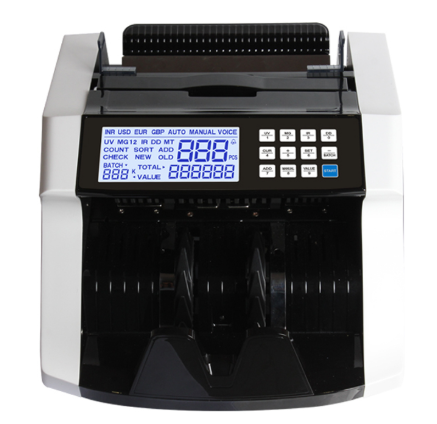
Calibration isn’t just a one-time setup; it’s an ongoing process to ensure your money counter machine adapts to the physical condition of the currency you handle. Follow these detailed steps to keep your Chuanwei Bill Counter in top-tier shape.
Adjusting the Feeding Gap (Thickness Control)
The feeding gap is the most common reason for counting errors. If the gap is too wide, you get “Double Notes”; if it’s too tight, you get “Jams.”
-
Locate the Adjustment Screw: On most Chuanwei models, this is a small knob or screw located at the top or rear near the hopper.
-
The “One Bill” Test: Place a single banknote between the feed rollers. You should feel a slight resistance when you pull the bill out. It should not slide out freely, nor should it be gripped so tightly that the paper tears.
-
Fine-Tuning: If you are adjusting money counter for polymer bills, turn the screw clockwise in small increments (usually 0.5mm at a time). Polymer is thinner and slicker, requiring a much more precise “pinch” than traditional paper.
Calibrating Optical and Counting Sensors
Over time, the sensitivity of the internal photo-sensors can drift.
-
Enter Calibration Mode: Most professional cash counting machine units have a service menu (check your Chuanwei manual for the specific button combination).
-
Clear the Path: Ensure no dust is blocking the IR (Infrared) sensors. If the machine’s “counting” light isn’t hitting the receiver at the correct intensity, it will miscount.
-
Standardize the Baseline: Run a stack of “known good” bills to let the software recalibrate its expected density levels.
Cleaning Money Counter Machine Rollers & Wheels
Dirty rollers are the leading cause of “skewed” bills, where the note enters the machine at an angle.
-
The Power-Off Clean: Turn off the power. Use a lint-free cloth lightly dampened with water or a specialized cleaning fluid. Rotate the rubber rollers manually to wipe the entire circumference.
-
The Cleaning Card Method: For a quick fix, run a “presaturated cleaning card” through the Bill Counter as if it were a banknote. This removes oils and ink residue from the internal feed path that your hands can’t reach.
Magnetism (MG) and UV Sensitivity Reset
If your machine is flagging genuine bills as “Counterfeit,” the detection heads may need a reset.
-
MG Sensor Alignment: Ensure the magnetic head is free of metallic dust. Even a tiny staple fragment stuck to the magnet can trigger constant errors.
-
UV Bulb Check: If your money counter uses UV detection, ensure the bulb or LED hasn’t dimmed with age. A weak UV light will fail to trigger the fluorescent security features on the bill.
Troubleshooting Common Issues

Even the best Money Counter can run into hiccups. Before you start searching for “money counter repair near me,” try these professional troubleshooting steps.
How to Fix Bill Counter Sensor Error (E1, E2, EA2, etc.)
Sensor errors are almost always environmental rather than mechanical.
-
The “Dust-Off” Trick: 90% of “Sensor Errors” are caused by paper dust. Use a can of compressed air to blow out the hopper, the stacker, and the internal counting track.
-
Avoid Direct Sunlight: High-intensity light (like a desk lamp or bright window) can “blind” the optical sensors. If your machine is throwing random errors, try moving it to a shaded area.
Frequent Jams and “Chains” Errors
A “Chain” error happens when two bills are fed too closely together, appearing as one long bill to the sensor.
-
Check the Hopper Tension: If the bills are flying in too fast, the machine can’t distinguish the gap between them. Loosen the hopper tension slightly.
-
Inspect for Foreign Objects: Check for paper clips, rubber bands, or “banknote confetti” (tiny circles of paper) stuck in the feed path.
“Suspicious Note” or False Counterfeit Alerts
It is incredibly frustrating when a money counter machine rejects real money.
-
Clean the MG Head: If the MG (Magnetic) sensor is dirty, it can’t read the magnetic ink on the bill. Use a cotton swab with a drop of rubbing alcohol to gently clean the magnetic head.
-
Check Bill Quality: Old, limp, or excessively dirty bills lack the “crispness” required for some sensors to read them. If the machine only rejects specific old bills, the machine is likely fine; the bills are just worn out.
Excessive Noise or Grinding
If your cash counting machine sounds like it’s struggling:
-
Check for Internal Obstructions: A small piece of a torn bill could be stuck in the internal gears.
-
Motor Health: If the grinding persists after cleaning, the drive belt may be slipping or worn. This is the point where you might contact a Chuanwei specialist for a replacement part.
Maintenance Checklist: Keep Your Chuanwei Running Smoothly
| Component | Maintenance Action | Frequency |
| Sensors | Blow out dust with compressed air | Daily / Every 2,000 notes |
| Feed Rollers | Clean with a damp cloth or cleaning card | Weekly |
| Hopper Plate | Check for debris or stuck paper scraps | Daily |
| Calibration | Adjust thickness screw for new bill types | As needed (e.g., when switching to polymer) |
Case Study: The Cost of Neglect
A bustling local convenience store recently contacted us because their older money counter machine was rejecting nearly 15% of all fit, genuine currency, forcing staff to recount by hand during peak hours. They were ready to retire the machine and were actively searching for “money counter repair near me.”
Upon inspection, our team found that the machine wasn’t broken; it was simply choked with “bill dust.” A single staple fragment was also stuck to the magnetic head, causing false counterfeit alerts.
The Solution: We performed a deep clean of the sensors and re-calibrated the feeding gap. The Result: The error rate dropped to less than 0.1%. In just one week, the store saved approximately 5 hours of manual labor, proving that a little DIY money counter maintenance goes a long way. This experience led them to upgrade their older fleet to professional Chuanwei Bill Counter models for even lower maintenance needs.
Upgrade Your Cash Management with Chuanwei
At Chuanwei, we understand that your time is money. While regular maintenance keeps your gear running, having a professional-grade Chuanwei Bill Counter makes the job significantly easier. Our machines are designed with user-accessible sensors and intuitive calibration settings, reducing the need to search for “money counter repair near me.”
Ready to eliminate counting errors for good?
[Explore the Chuanwei Professional Series today] and experience the gold standard in speed and accuracy.
FAQs: Money Counter Maintenance
Q1: How often should I clean my money counter machine?
A1: For high-volume businesses, we recommend a quick dusting of the sensors daily and a deep cleaning of the rollers weekly to ensure the Bill Counter remains accurate.
Q2: My machine keeps showing a “Double Note” error. What should I do?
A2: This is usually a thickness adjustment issue. Try tightening the adjustment screw on the back of your money counter machine slightly to narrow the feeding gap.
Q3: Can I use alcohol to clean the rollers?
A3: It is best to use a specialized cleaning card or a very slightly dampened cloth. Harsh chemicals can dry out the rubber rollers over time.
Q4: How do I know if I need to adjust for polymer bills?
A4: If you are adjusting money counter for polymer bills, you will notice the machine often pulls two notes at once because they are thinner. Tightening the feed gap is the standard fix.
Q5: What is the most common cause of a sensor error?
A5: Knowing how to fix bill counter sensor error codes usually starts with simply using compressed air to clear the optical path.

